
The hard part of the letter is done. You’ve named the job, told your best story and explained why this company. Then the last paragraph stalls: “I look forward to hearing from you” feels flat, “Cheers” feels too casual, and you’re not sure whether a PDF needs a signature. Knowing how to end a cover letter comes down to three small parts, and each one has a short list of choices that work.
To end a cover letter, write a two- or three-sentence closing paragraph that restates your fit, thanks the reader and asks for a conversation. Then add a professional sign-off such as “Sincerely,” or “Best regards,” followed by your full name. Keep the closing paragraph to about 25 to 50 words.
How to end a cover letter in three parts
Every strong cover letter ending has the same three pieces, in this order.
1. The closing paragraph. Two or three sentences that do three jobs:
- Restate your fit in one line, tied to something the employer needs.
- Thank the reader for their time or consideration.
- Ask for a next step, usually a conversation or an interview. This is your call to action.
2. The sign-off. A short phrase and a comma: “Sincerely,” “Best regards,” “Kind regards,” “Thank you,” or “Respectfully,”.
3. Your name. Your full name, typed on the line below the sign-off. In a printed letter, a handwritten signature goes between the two.
Put together, it looks like this:
I’d bring the same focus on clear, on-time reporting to your finance team. Thank you for considering my application, and I’d welcome the chance to talk about the role.
Sincerely,
Maya Hernandez
That’s 30 words in the closing paragraph. The careers service Prospects puts the job of the last paragraph plainly: “Reiterate your interest in the role and indicate your desire for an interview.” The formula above does exactly that, with thanks added so it doesn’t read as a demand.
Why this order works: a hiring manager who skims a cover letter reads the first and last lines most closely. A closing paragraph that repeats your strongest fit point gives them one last reason to open your resume, and a clear next step tells them what to do with it.
Cover letter closing paragraph examples
Here are 20 cover letter closing paragraphs you can adapt, grouped by situation. Swap in your own role, company and strengths. Each one follows the same formula: fit, thanks, next step.
General closings for experienced candidates
- “With six years of B2B account management behind me, I’m confident I can help your team grow renewals in the mid-market segment. Thank you for your time, and I’d welcome a conversation about the role.”
- “I’d love to bring the process I used to cut our month-end close from ten days to six to your finance team. Thank you for considering my application; I look forward to discussing how I can help.”
- “Your focus on accessible design is exactly the kind of work I want to do more of. Thank you for reading, and I’d be glad to walk you through my portfolio in an interview.”
Entry-level and new graduate closings
- “As a recent marketing graduate who ran social media for a 2,000-member student association, I’m eager to start my career on your content team. Thank you for your consideration, and I’d welcome the chance to talk.”
- “I’m ready to put the data analysis skills from my internship and capstone project to work in your analyst program. Thank you for your time; I’d be happy to share my project work in an interview.”
- “I’d bring energy, a quick learning curve and two summers of customer-facing retail experience to this role. Thank you for considering me, and I hope to hear from you about next steps.”
Career change closings
- “Eight years of teaching taught me to explain complex ideas clearly and keep projects on schedule, and I’m excited to bring both to instructional design. Thank you for considering my application; I’d welcome a conversation about the role.”
- “My move from hospitality into operations is a natural next step: I’ve spent five years managing schedules, budgets and vendor contracts for a 40-room hotel. Thank you for your time, and I’d love to discuss how that experience fits your team.”
- “I’ve completed the Google Data Analytics Certificate and built three dashboards for my current employer, and I’m ready to do this work full time. Thank you for reading; I’d be glad to talk about the transition in more detail.”
Referral closings
- “Jordan Lee spoke highly of your team’s culture, and after learning more about your product roadmap, I’m even more excited about this role. Thank you for your time, and I’d welcome the chance to meet.”
- “Thank you to Priya Shah for suggesting I apply, and thank you for considering my application. I’d be glad to talk about how my supply chain experience can support your expansion into new markets.”
Internal move closings
- “Over three years on the support team, I’ve learned our product and our customers inside out, and I’d love to bring that knowledge to product management. Thank you for considering my application; I’m happy to meet whenever suits you.”
- “I’m proud of what we’ve built in the Denver office, and I’m ready to take on the team lead role and help the next group of hires get up to speed. Thank you for your support and for considering me.”
Email application closings
When the email body is the cover letter, keep the close shorter and mention the attachment.
- “My resume is attached. Thank you for your time, and I’d welcome the chance to talk this week or next.”
- “I’ve attached my resume and portfolio link for your review. Thank you for considering me for the Graphic Designer role, and I look forward to hearing from you.”
- “Thank you for reading. My resume is attached, and I’m available for a call at any time that works for you.”
Short closings for application text boxes
- “Thank you for your consideration. I’d welcome the chance to discuss the role.”
- “I’d love to bring this experience to your team. Thank you for your time.”
Closings that add one useful detail
- “Thank you for your consideration. I’ll be in Chicago from November 3 to 7 and would be glad to meet in person if that’s helpful.”
- “I’m available to start in January and would welcome a conversation about the role. Thank you for your time and consideration.”
Prospects also suggests mentioning any dates when you won’t be available, and example 19 shows the same idea from the other side. A short logistics line like this is useful only when it changes something for the employer, such as your start date, relocation or travel plans.
Cover letter sign-offs, ranked from best to avoid
The sign-off is one or two words, but it’s the last thing the reader sees before your name. Here’s how the common options compare.
| Sign-off | Tone | Best for |
|---|---|---|
| Sincerely, | Formal, neutral | Any cover letter, any industry. The safest default. |
| Best regards, | Professional, a little warmer | Most cover letters, especially in emails |
| Kind regards, | Polite and friendly | Corporate, creative and international roles |
| Thank you, | Warm and direct | Letters where the closing paragraph doesn’t already end in thanks |
| Respectfully, | Very formal | Government, military, legal and academic applications |
| Best, | Casual | Short follow-up emails to someone you already know |
| Cheers, / Thanks! / Warmly, | Too casual or personal | Keep these for friends and colleagues |
| Love, / XOXO / no sign-off | Inappropriate | Skip in every cover letter |
Sincerely vs. Best regards: both are correct. Sincerely is slightly more formal and suits printed or PDF letters. Best regards reads naturally at the end of an email. When in doubt, pick Sincerely.
Yours sincerely vs. Yours faithfully: this pairing is a UK convention. Per Prospects’ cover letter guide, a letter with a named contact ends “Yours sincerely,” and one addressed generally ends “Yours faithfully.” US letters usually just use “Sincerely.” Either way, your sign-off should match your greeting, which is why our guide on how to address a cover letter recommends finding a name whenever you can.
Two small formatting rules apply to every option: capitalize only the first word (“Best regards,” not “Best Regards,”) and put a comma after it.
Signature block format for PDF and email
The signature block changes with the way you send the letter.
Printed letter or PDF attachment. Follow standard business letter format. Purdue’s Online Writing Lab says to “leave four lines between the closing and the sender’s name for a signature” and to type Enclosures below the closing when you include other documents, such as a resume (Purdue OWL, Basic Business Letters). For a PDF, that gap can hold a scanned signature, or you can close it up and type your name alone. Both are fine; a typed name is what most applicants send.
Sincerely,

[signature, optional]

Maya Hernandez

Enclosure: Resume
Your phone number and email already sit in the header of a PDF letter, so they don’t need repeating under your name.
Email. Skip the signature gap. Put your sign-off, your full name, then your contact details on the lines below:
Best regards,
Maya Hernandez
(555) 123-4567 | [email protected]
linkedin.com/in/mayahernandez
In an email, these lines are the only contact block the recruiter sees, so include a phone number and a LinkedIn or portfolio link if you have one.
Online application text box. End with the sign-off and your typed name. Formatting is often stripped, so plain text is best.
What not to end a cover letter with
Knowing how to end a cover letter also means knowing which lines to leave out. A few endings undo a good letter in the last line. Watch for these:
- A generic line on its own. “I look forward to hearing from you” is polite, but by itself it says nothing about the job. Pair it with a line about fit.
- Pushy or presumptuous language. “I’ll call you next Tuesday to schedule an interview” or “I know I’m the perfect candidate” puts pressure on the reader. Invite a conversation instead.
- Apologies and hedges. “Although I don’t have all the qualifications…” ends on your weakest point. Close on your strongest.
- Desperation. “I really need this job” shifts the focus from what you’ll bring to what you need.
- A new topic. The close isn’t the place for salary expectations, a second story or a list of extra skills.
- Repeating the opening word for word. Restate your fit in fresh words, tied to the employer’s need.
- A missing name or the wrong company. When you reuse a letter, the closing paragraph is where an old company name most often slips through. Read it last, out loud.
A closing paragraph that runs past 50 words is usually doing one of the jobs above. Trim it back to fit, thanks and next step. If the whole letter feels long, our guide to how long a cover letter should be breaks the word budget down by paragraph.
A quick check before you send
Read the last few lines of your letter and confirm:
- The closing paragraph is two or three sentences, about 25 to 50 words.
- It mentions this company or role, not just “the position.”
- It thanks the reader and asks for a conversation or interview.
- The sign-off matches the format: Sincerely or Best regards for most letters.
- Your full name sits under the sign-off, with contact details below it in an email.
- The company name is right everywhere, including the close.
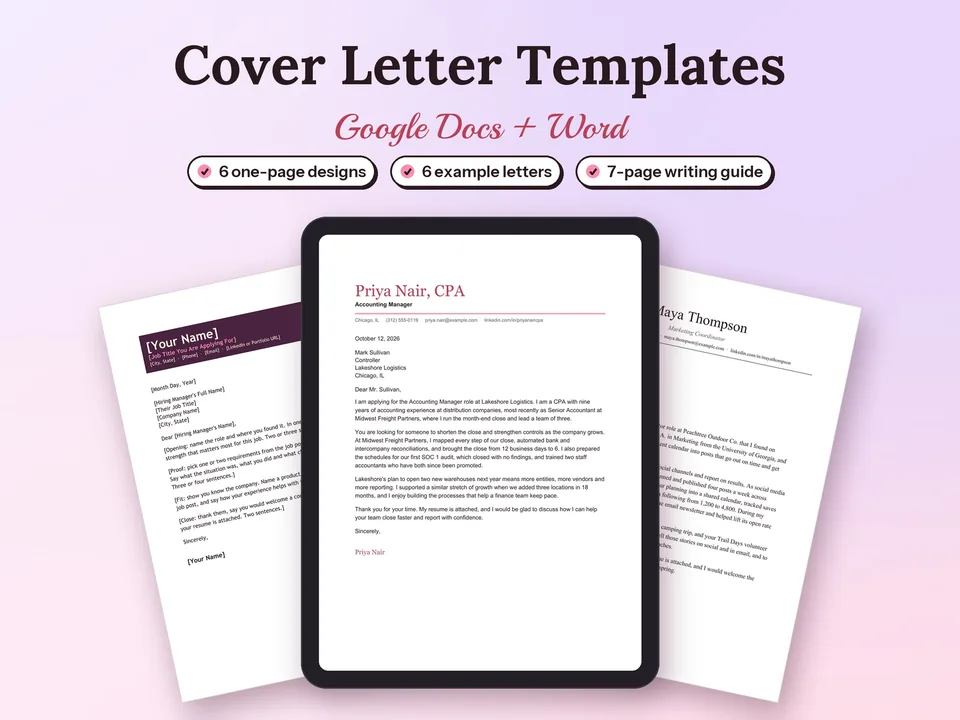
If you’d rather start from a layout with the closing already built in, our Cover Letter Templates for Google Docs include six one-page designs and six finished example letters, each with a complete ending to adapt.
End on the next step
A good cover letter ending is short and specific: one line on why you fit, a thank-you, a request for a conversation, then “Sincerely” and your name. Pick the example above that matches your situation, swap in your own details, and check it against the list before you send. To write the whole letter in one sitting, the free cover letter builder walks you through four guided paragraphs, including the close, lets you choose from five sign-offs and downloads a one-page letter as a Word file or PDF.
Questions people ask
What is a good closing sentence for a letter?
A good closing sentence thanks the reader and names a next step in one line. For a cover letter, try: "Thank you for your time; I'd welcome the chance to talk about how I can help your team reach its goals this year." It's polite, specific to the job and gives the hiring manager an easy reason to reply. Follow it with a sign-off such as Sincerely and your full name.
What are the three golden rules in writing the cover letter?
Write it for one job, keep it to one page, and back every claim with proof. Tailoring means naming the company and the role and using the job post's own words. One page means about 250 to 400 words. Proof means a real result, ideally with a number. The ending follows the same rules: one specific line about fit, thanks and a clear next step.
How to write an application letter?
An application letter follows the cover letter format: your contact details and the date, a greeting to a named person, an opening that names the role, one or two paragraphs of proof and fit, and a short close. End with a closing paragraph that thanks the reader and asks for a conversation, then a sign-off such as Sincerely and your full name.
What is a cover letter for a job?
A cover letter is a one-page letter sent with your resume that explains why you want a specific job and why you're a good fit for it. It adds what a resume can't: a reason for applying, context for a career change, and one or two results told as a short story. It ends with thanks, a request for an interview, a sign-off and your name.
Should you say thank you at the end of a cover letter?
Yes. Thanking the reader is the most common way to open the closing paragraph, and it keeps the tone polite without sounding stiff. Keep it to one short sentence, such as "Thank you for considering my application," and follow it with the next step you'd like, usually a conversation or an interview. "Thank you" also works as the sign-off itself.
Is it okay to end a cover letter with Best?
"Best" on its own reads as a quick email sign-off. It's fine in a short email to a recruiter you already know, but for a formal cover letter use "Best regards" or "Sincerely" instead. They take two seconds longer to type and suit every industry, from law and finance to startups and nonprofits.
Should I use Yours sincerely or Yours faithfully?
In UK-style letters, "Yours sincerely" goes with a named greeting (Dear Ms Patel) and "Yours faithfully" with an unnamed one (Dear Sir or Madam). US letters usually drop "Yours" and use "Sincerely" in both cases. If you can find the hiring manager's name, use it, and Sincerely becomes the natural choice.