
You’ve bought planners before. The first week looks great, then life gets busy, you miss a few days, and the next time you open it there’s a run of blank dated pages staring back at you. So the planner goes in a drawer. The best planner for ADHD is the one that makes coming back easy: no wasted pages, no long setup, and a place to dump everything that’s rattling around your head before you sort it.
The best planner for ADHD is one you can restart any day without guilt. Look for undated pages, one page per day, a brain dump space, visual time blocks, routine checklists you don’t rewrite each week, and low setup effort. Our pick is a printable undated planner; apps like Tiimo or Structured suit people who need reminders.
What makes a good planner for ADHD?
A good planner for ADHD is one that survives a missed week. That single test rules out a lot of pretty planners. Here are the practical criteria we used to pick the options below. They’re about how the pages are laid out, not medical claims.
- Undated pages. Dated planners punish gaps. With undated pages you write today’s date and keep going, so a lost week costs nothing.
- One page per day. A whole day on one page means no flipping between a weekly spread, a notes section and a to-do list. Everything for today is in one place.
- Brain dump space. Tasks, ideas and worries arrive all at once. A blank area to dump them fast, then sort later, beats trying to file each one as it shows up.
- Visual time blocks. A column of hours you can shade in shows how much of the day is already spoken for. It’s easier to see that three “quick” errands fill an afternoon.
- Routines you tick, not rewrite. Morning, evening and weekly chores should be a checklist you reuse. Rewriting them every week is setup effort, and setup effort is where planners die.
- Low setup effort. If it takes an hour of stickers and color-coding before the planner is usable, it’ll be usable for about a week.
One more thing worth knowing: paper and apps fail in different ways. Paper is easy to forget at home. Apps are easy to ignore once the notifications pile up. Plenty of people end up with one of each, a paper page for today and an app for reminders.
A planner is a tool for seeing your tasks, not a treatment. The National Institute of Mental Health notes that ADHD symptoms begin in childhood and usually continue into the teen years and adulthood, and lists trouble staying organized among the signs of inattention. If ADHD is affecting your daily life, a doctor or other healthcare professional is the right place to start.
1. Clara Vale ADHD Life Planner & Daily Task Tracker: printable, undated, built around home routines
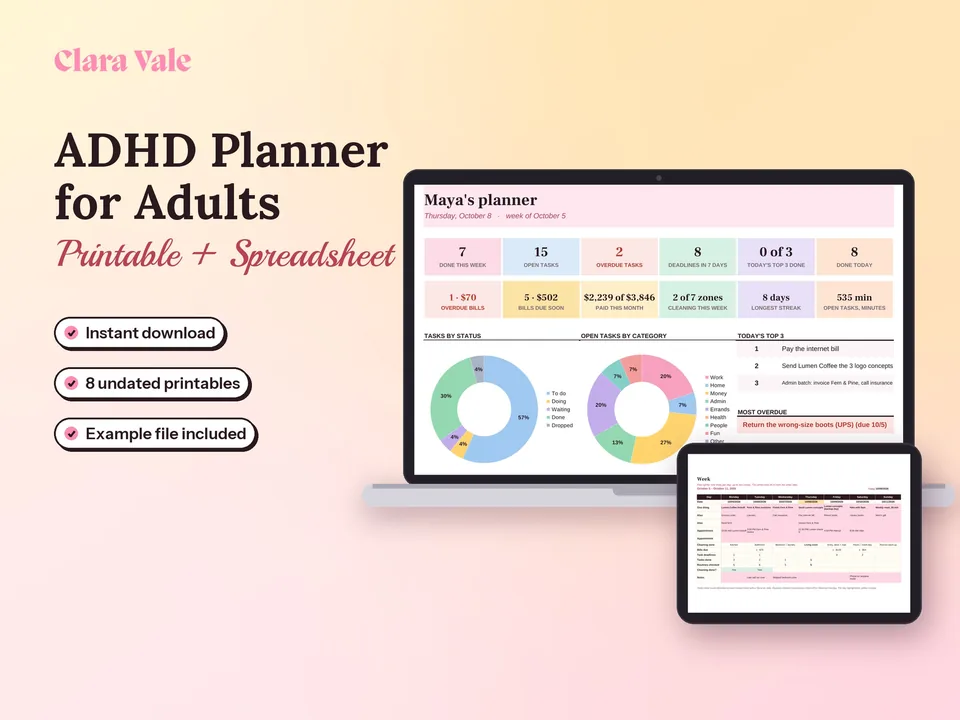
Our ADHD Life Planner & Daily Task Tracker is a printable, undated planner with a matching spreadsheet. Here’s exactly what’s in it.
- Undated daily and weekly pages. Print a day when you need one. Skip a week and nothing is wasted.
- Brain dump & sort. One page to empty your head, then a sort step that splits the pile into today, this week and later.
- Routine checklists. Morning, evening and weekly routines you print once and tick off.
- 15-minute cleaning rotation. Small daily cleaning tasks that rotate through the house, so no single day turns into a cleaning marathon.
- Habit tracker. A simple grid to mark the habits you’re keeping an eye on.
- Bill checklist. A monthly list of what’s due, so bills stop hiding in your inbox.
- A spreadsheet. The planner comes with a spreadsheet as well as the printable pages, for anyone who’d rather keep lists on a screen.
We kept every page undated for one reason: the planner has to work after a bad week, not just a good one. If bills are the part of life that slips most, pair the bill checklist with a monthly budget template for Google Sheets so you can see the money side too.
Best for: adults who want paper pages for home, routines and chores, with nothing to set up.
2. Laurel Denise Planners: paper, month and week on one spread
Laurel Denise is a paper planner brand that turns up again and again in lists of the best planners for ADHD, and the appeal is the layout: you see the month and the week at the same time, so a deadline three weeks out doesn’t vanish when you turn the page.
Laurel Denise’s comparison page lists the Scout with the month above the week, in large (9.75” × 11”) and small (7.25” × 9”) sizes, as yearly, academic or undated editions. The Nancy puts the month beside the week. The Claire and the Billie are undated only, with the month above or beside the days. For ADHD, the undated editions are the ones to look at.
The trade-off is that these are weekly layouts, not one page per day. If your days are busy enough to need an hour-by-hour column, you may outgrow the space. We couldn’t confirm current prices on the official site, so check the product page before you buy.
Best for: people who like paper and lose track of anything more than a week away.
3. Tiimo: an ADHD-specific visual planner app
Tiimo is the most openly ADHD-focused option on this list, a planner app for ADHD rather than a general to-do app. The company says the app was “built by and for neurodivergent people from the start.” It lays the day out as a color-coded visual timeline and adds a focus timer for starting and switching tasks, a to-do list that works as a brain dump, routines, widgets and mood tracking.
Tiimo runs on iPhone, iPad, Apple Watch, Android, Mac and the web. Per Tiimo’s FAQ, the free version includes a selection of planning tools on the iOS and Android apps only (the web app isn’t included), and Tiimo Pro is a paid subscription with a 7-day trial. Tiimo says prices vary by location and shows the local price at checkout, so we haven’t listed one.
Best for: people who need the phone to nudge them through the day and like seeing time as colored blocks.
4. Structured: a day planner app with one visual timeline
Structured is a day planner app that puts your tasks and your calendar events on a single timeline. You can import an existing calendar, set recurring tasks for habits and routines, switch between day, week and month views, and get notifications and home screen widgets. It works on iPhone, Apple Watch and the web.
The timeline is the reason it works as a planner for ADHD, especially for people who struggle with time. A task has a start time and a length, so it takes up visible space, and an overloaded day looks overloaded. Structured has a free version and a Pro upgrade sold as a monthly, yearly or lifetime purchase. Its help center says Pro pricing depends on your region and currency, so check the app store for your price.
Best for: people who want time blocking without paper, and anyone who already lives in a phone calendar.
5. The Bullet Journal Method: a method, not a product
Bullet journaling is a way of using any blank notebook as a planner. Ryder Carroll created the method, and his book describes it as “part productivity system, part mindfulness practice.” You write tasks as short bullets, keep a daily log, and at the end of each month move unfinished tasks forward or cross them out. That last step, called migration, is a built-in monthly reset.
The method shows up in most ADHD planner roundups, and it has a strong ADHD following. The book page quotes Jessica McCabe of How to ADHD on why: a planner “flexible enough to keep up with their brain, but structured enough to keep them on track.” Because you draw each page as you go, a missed week simply doesn’t exist on paper.
The catch is setup. Social media is full of hand-lettered spreads that take hours. The original method is plain bullets in a notebook, and that’s the version worth trying. Any notebook works, so the cost is whatever you pay for one; the official book and notebooks are optional.
Best for: people who like paper, hate wasted pages and are happy to draw a few lines each day.
6. Google Calendar: the free option you already have
If you have a Google account, you already have a free planner. Google Calendar is free for personal use and covers the basics: color-coded calendars, recurring events, reminders and notifications, and tasks shown right on the calendar.
To use it as a planner for ADHD, block time instead of listing tasks. Turn “do laundry” into a 30-minute event at 6 p.m. with a reminder. Make your routines recurring events so they appear on their own each week. Give chores, work and appointments different colors so a crowded day is obvious at a glance.
It won’t give you a brain dump page or a habit tracker, and it’s only as good as the alerts you keep turned on. But it costs nothing and it’s already on your phone.
Best for: anyone who wants to try time blocking before paying for anything.
How do the best planners for ADHD compare?
Here’s how the six options stack up on format, price and fit. The best planner for ADHD is the one whose “best for” column sounds like your week.
| Option | Format | Price | Best for |
|---|---|---|---|
| Clara Vale ADHD Life Planner & Daily Task Tracker | Printable undated pages + spreadsheet | $9 | Home routines, chores and bills with no setup |
| Laurel Denise (undated editions) | Paper, weekly layouts with month view | Not verified, see site | Seeing the month and week together |
| Tiimo | App (iOS, Android, Mac, web) | Free version; Pro varies by region | Visual timeline with nudges and focus timers |
| Structured | App (iPhone, Apple Watch, web) | Free version; Pro monthly, yearly or lifetime, varies by region | Time blocking on one timeline |
| Bullet Journal Method | Method, any notebook | Cost of a notebook | Paper users who hate wasted pages |
| Google Calendar | Web and mobile app | Free for personal use | Trying time blocking for free |
A simple way to choose: if you lose track of time, start with a timeline (Structured, Tiimo or Google Calendar). If you lose track of tasks, start with a brain dump page (a bullet journal or our planner). If home routines are what keep slipping, pick something with reusable checklists. Meals are a common one; our guide to family meal planning shows how to turn dinners into a weekly routine instead of a nightly decision.
Which planner should you start with?
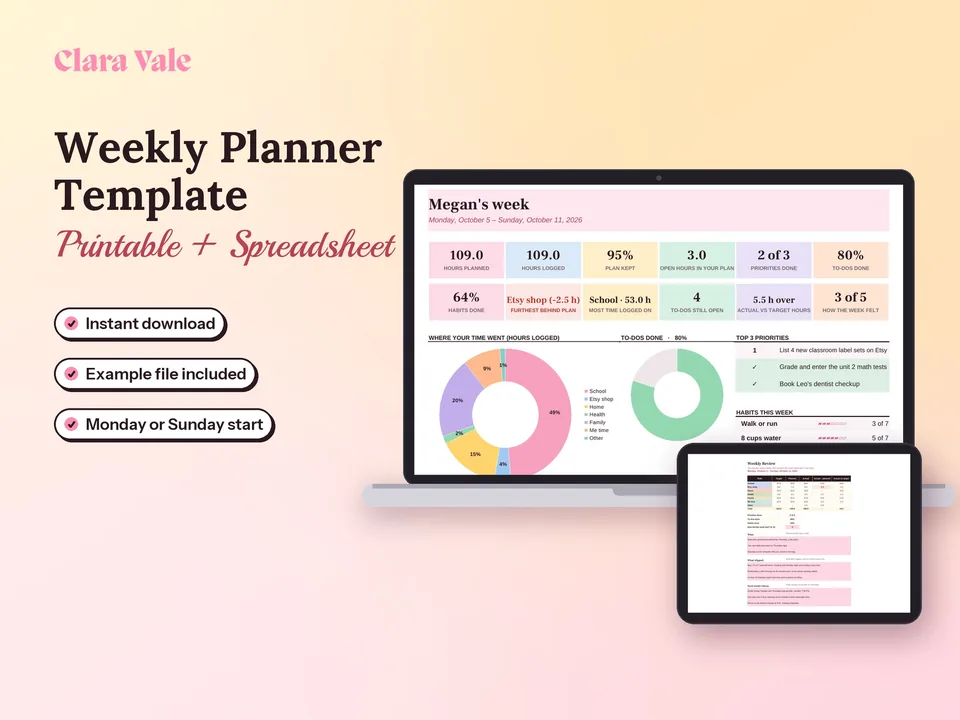
The best planner for ADHD to start with is whichever option takes the least effort to open tomorrow morning. For most people that’s an undated page with today’s tasks, a brain dump space and a few time blocks, plus one app for reminders if paper gets left behind. Give it two weeks before judging it, and expect to skip days. If you’d rather plan a whole week hour by hour and see where your time went, the Weekly Planner Template & Time Tracker does that in Google Sheets, Excel or print.
Questions people ask
What kind of planner is best for ADHD?
An undated planner with one page per day, a brain dump area and a simple time-block column tends to hold up best, because a skipped week doesn't leave blank dated pages behind. Paper suits people who remember what they write by hand. An app suits people who need reminders. Many people use one of each.
What is the 1–3-5 rule for ADHD?
The 1-3-5 rule is a to-do list method, not an ADHD rule as such: each day you pick one big task, three medium tasks and five small ones, and nothing else goes on the list. It caps the day at nine items, which keeps the list honest. It fits neatly on a one-page daily planner.
What is the best organizer for someone with ADHD?
The best organizer is the one that sits where you already look. For some people that's a paper planner left open on the kitchen counter; for others it's a phone app with alerts. Look for low setup effort, a place to dump stray tasks fast, and routines you can tick off without rewriting them every week.
What is the best planning system for people with ADHD?
A simple capture-sort-schedule loop works for most people: dump every task onto one page, sort it into today, this week and later, then give only today's few tasks a time slot. Bullet journaling, the Planner Pad funnel and most ADHD planners are versions of this loop with different page designs.
What's the best planner app for ADHD?
Tiimo and Structured are two well-known visual planner apps. Tiimo describes itself as built by and for neurodivergent people and adds focus timers and routines. Structured puts tasks and calendar events on one timeline. Both have a free version and a Pro subscription whose price depends on your region.
Do planners actually help ADHD?
A planner is an organizing tool, not a treatment. It can make tasks, appointments and routines easier to see, which many people find useful, but it doesn't change ADHD itself. If ADHD symptoms are affecting your work, money or relationships, talk to a doctor or other healthcare professional about support.